
Application Procedure MRCP-1
Create your My MRCP(UK)
🌐Go to the official site : https://mymrcp.mrcpuk.org
✅Register using your full legal name (as on passport/degree), date of birth, email, and phone.
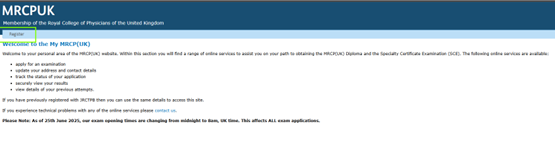
Click on Register
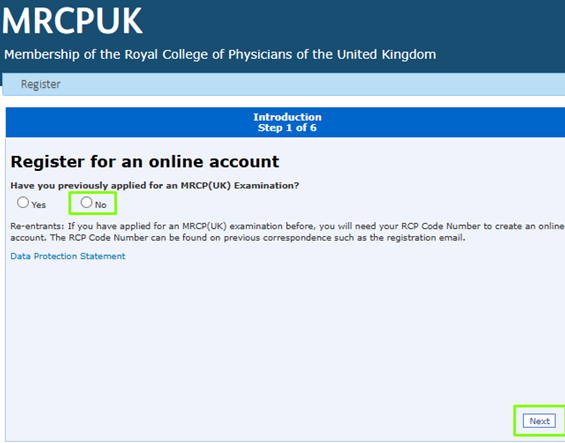
Select Yes or No According to Individual Perspective
and then click on next
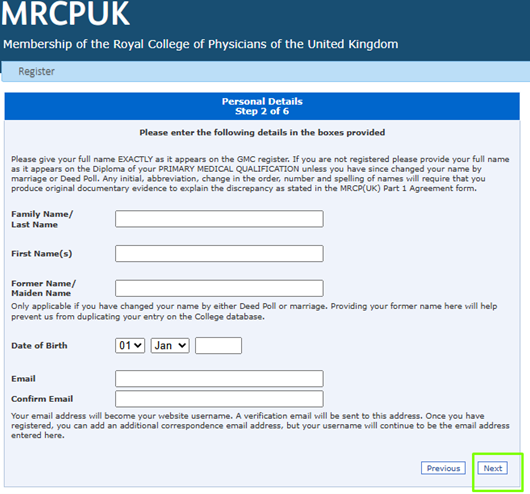
Enter the Above Details with the Required
Information and click on next
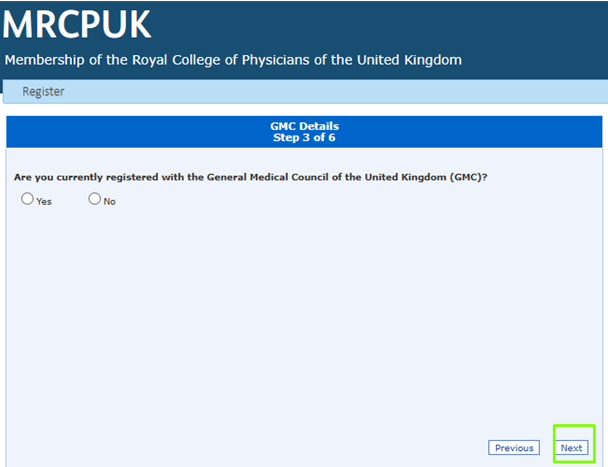
Select Yes or No According to you and click on next
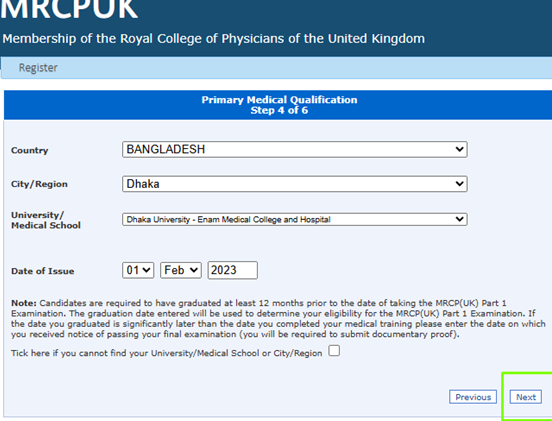
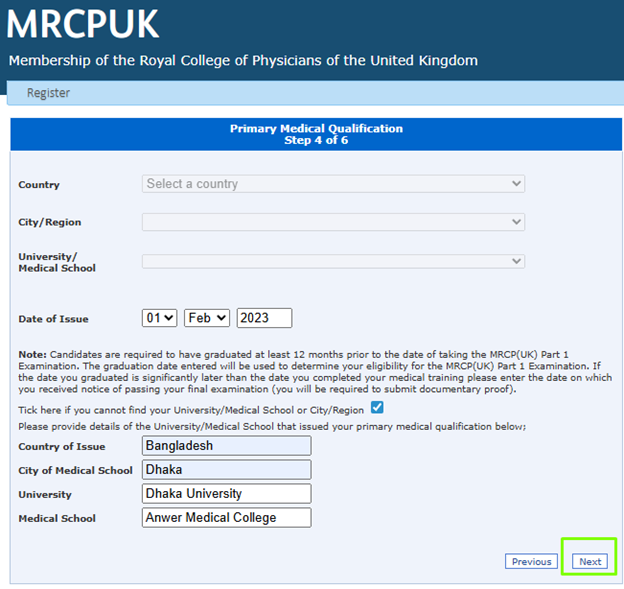
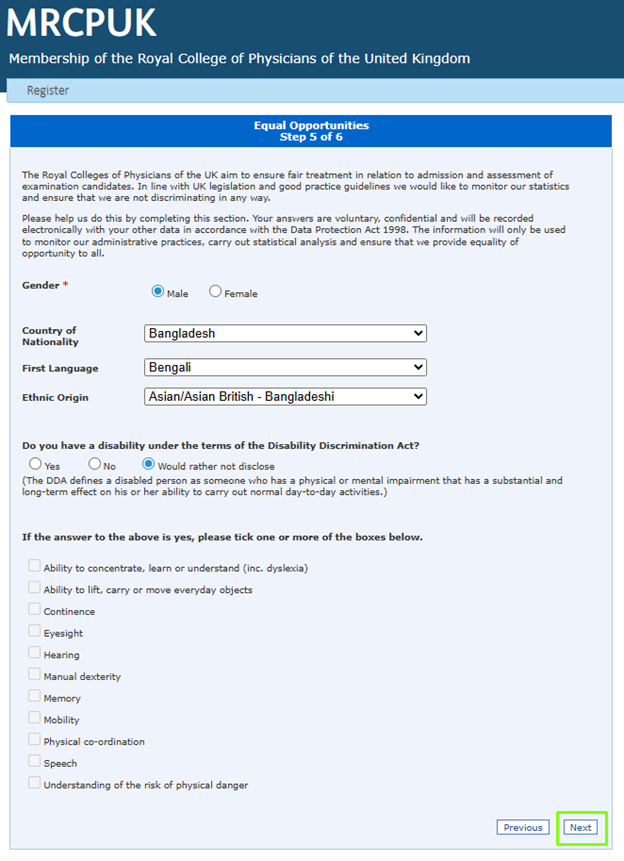
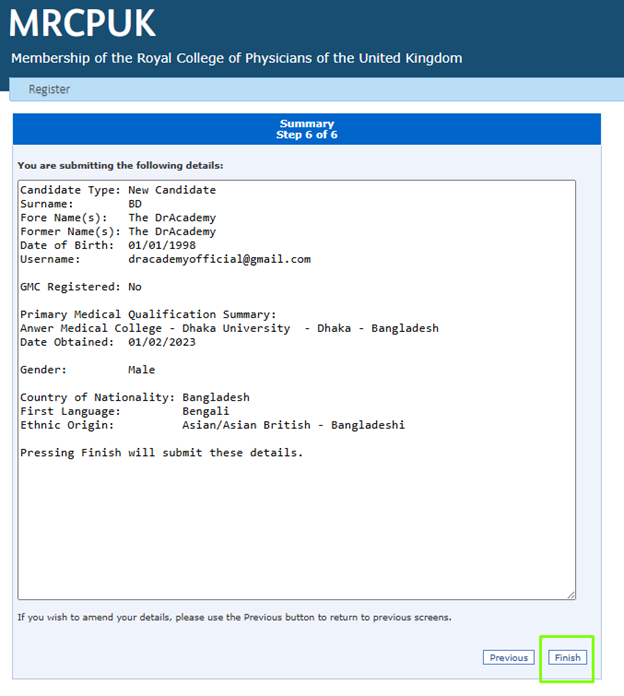
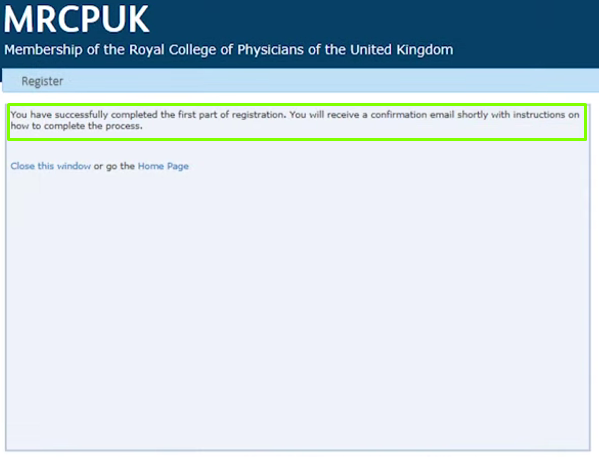
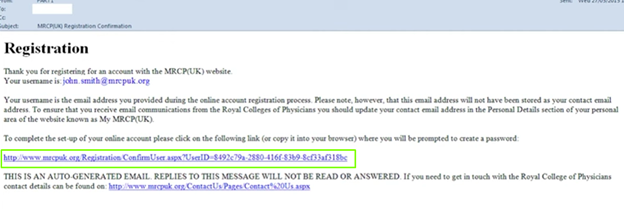
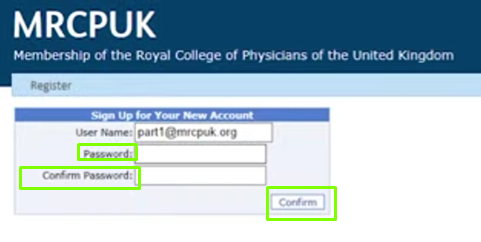
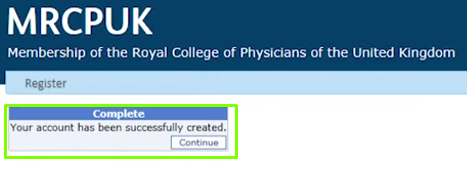
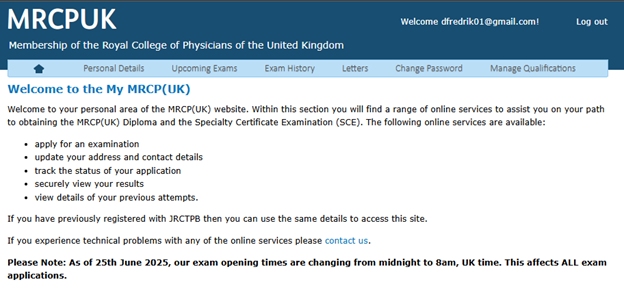
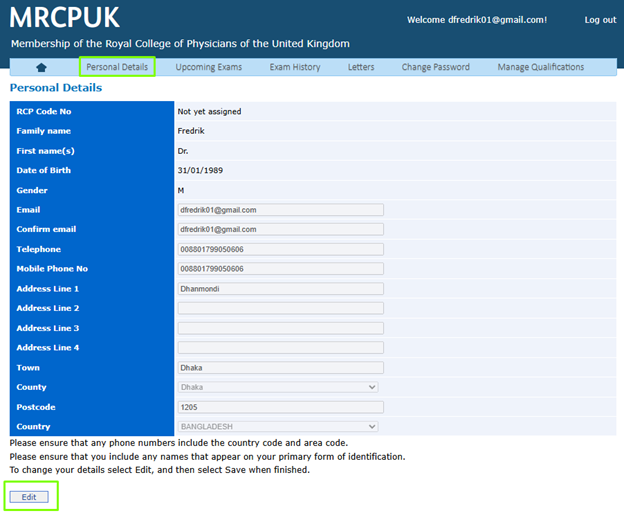
Verify your Email (if prompted) & Log in.
Video help: “How to open a MyMRCP(UK) account” — https://youtu.be/6YOI9Sm0xPk
Prepare before you Apply
✅ Log in and open your Profile.
✅ Ensure all personal details are correct.
✅ Add a correspondence address.
✅ Keep a clear scan of your Primary Medical Qualification (PMQ) ready (PDF/JPEG, Max 2MB).
✅ From your dashboard, choose Apply for MRCP (UK) Part-1.
✅ Confirm whether you are training in the UK or outside the UK.
✅ Select your preferred examination centre (e.g., Dhaka, Delhi, etc.).
✅ If you require special arrangements (e.g., disability adjustments), complete that section.
✅ Review everything and click Submit.
What you receive now:
✅ An RCP code/number gets assigned to your account after submission.
✅ You’ll use this RCP code in your PMQ email.
Video help:
“MRCP(UK) Part-1 online application” — https://youtu.be/GZL0LmdYY2Q
✅ Compose an email to MRCPPMQ@thefederation.uk.
✅ Subject line: Primary Medical Qualification – RCP XXXXXXX (replace with your RCP code).
- Format: PDF or JPEG only (no passwords).
- Include all pages and both sides if double-sided.
- Keep each email under 2 MB (send multiple emails if needed).
- No ZIP files and no Google Drive links.
- If the original isn’t in English, attach an official English translation.
✅ Send during the application window. Files sent before the window opens won’t be processed.
✅ If you hold GMC provisional or full registration, include your GMC number in the application; in that case, you don’t need to send the PMQ scan unless they ask.
🕒 Processing time:
✅ Due to volume, PMQ verification can take up to 4 weeks after the application period closes.
✅ Option A: Pay online (recommended)
- Go to MyMRCP(UK) → your application → Pay.
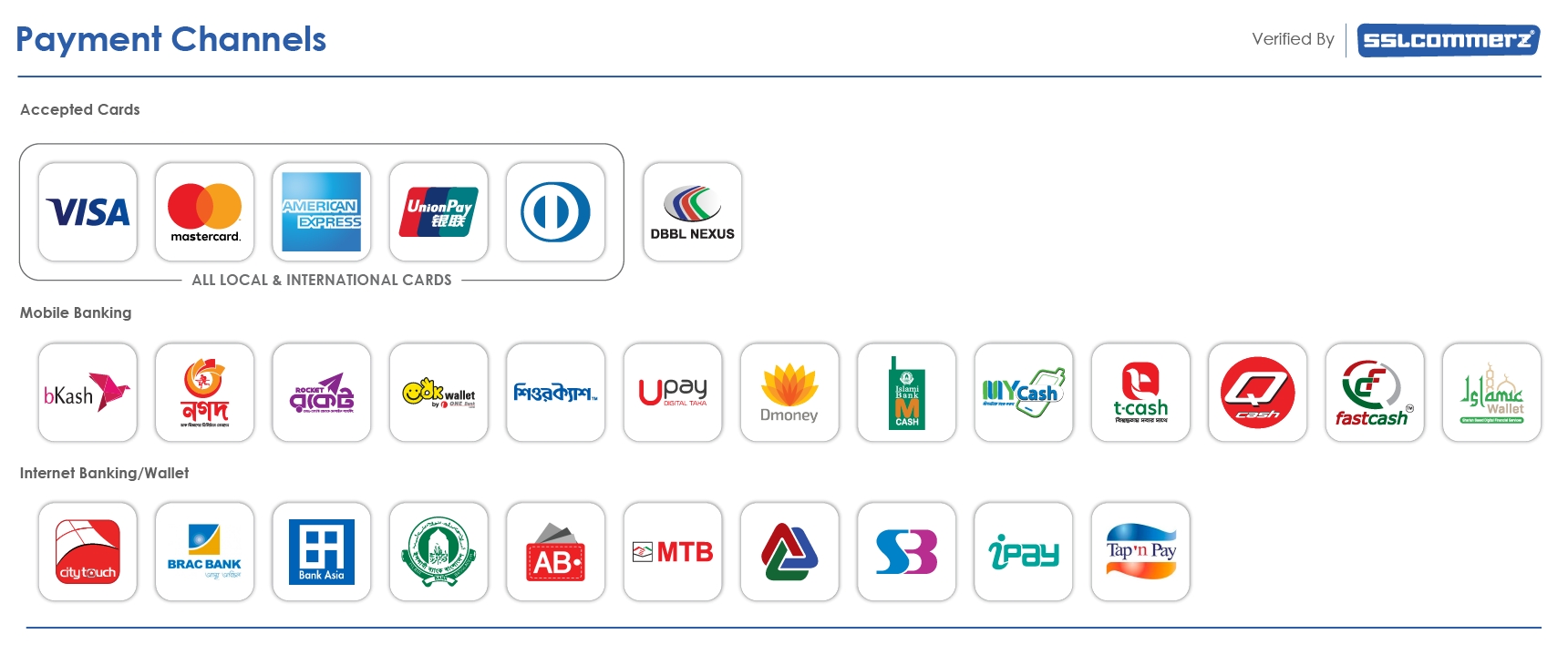
- Pay with Visa/Mastercard (credit/debit).
- Ensure the payment status shows successful in your account.
✅ Option B: Pay by Phone (only if online fails)
- Contact the MRCP(UK) central office.
- Provide card number (16 digits), expiry (MM/YY), and CVV (3 digits).
- Do not email card details—emails with card info
are deleted and no payment will be processed.
✅ Watch for a confirmation email (application received).
✅ After PMQ approval, your application is fully verified.
✅ Before the exam, download your admission document/entry form from your account.
✅ Keep monitoring your MyMRCP(UK) dashboard and email for updates.
If a regulator (e.g., GMC or other medical council) has imposed any constraints (conditions, interim orders, undertakings, warnings):
✅ Complete the Candidate Declaration Form (as prompted by MRCP(UK)).
✅ Provide: Name, Title, Date of Birth, Email, RCP number, GMC/Regulator number, Exam applied for, Diet/Date.
✅ Enter the type of constraint, start date, end date, and exact wording of the condition/undertaking/warning (copied in full from regulator records).
✅ Submit the form as instructed on the portal.
✅ Complete any captcha/spam prevention and click Submit.
✅ If you plan to sit in Hong Kong, follow the specific instructions for Hong Kong on the MRCP(UK) website (regional processes can differ).
✅ Do match your name on account, passport, and PMQ.
✅ Do send PMQ only during the open application window.
✅ Do keep scans clear, legible, and in PDF/JPEG.
✅ Don’t send ZIPs or Google Drive links—they won’t be accepted.
✅ Don’t email card details—ever. Pay online or by phone only.
✅ Don’t post physical documents—email only.
➡️ MyMRCP account video: https://youtu.be/6YOI9Sm0xPk
➡️ Part-1 application video: https://youtu.be/GZL0LmdYY2Q
➡️ PMQ email: MRCPPMQ@thefederation.uk
➡️ Official site: mrcpuk.org
Thank You!!

Featured links
Contact us
Phone:(+88) - 017 3355 2110
Email: thedracademy@gmail.com


⚠️ Important Notice – eLearning
User Policy

Dear Doctor,
⚠️ Suspicious Login Activity Detected
👨⚕️ Dear Doctor,
Our automated system has detected that you have violated the e-Learning User Policy by logging from multiple devices instead of your registered device.
As a result, your account has been temporarily blocked.
📌 What to do next:
You have been blocked for 72 hours for violating our Terms & Conditions:
✅After 72 hours, you may try logging in to your account again to regain access.
✅Strictly follow the Terms & Conditions and User Policy of our e-learning platform.
✅A written commitment that you will not repeat this in the future.
⚠️ Important: Any further violation will result in your account being PERMANENTLY BLOCKED🚫 from our platform.
Regards,
Automated Server Security Team
⚠️ Important Notice Regarding Your e-Learning Device Access
Dear Doctor,
This is an important notice regarding your device access for the e-learning platform. Please ensure your registered device information is updated to continue your e-learning access.
Or
Provide your device info to continue e-learning
With regards,
The DrAcademy Team
Congratulations 🎉
from
The DrAcademy!
You Have Completed Your Course Successfully !🎓
Do You Need More Time ?
You Can Still Extend Your Course According to Your Requirements !
Course Extension+ (Live Class + eLearning Access): Course Extension+ is a good option for each candidate to continue or revise your full course till to your exam. 👇

🔥Unlock All Premium Modules Now!
⚡Enjoy All Classes @Your Own Comfort.
⚡After Unlocked, You Can Access All Classes & Lectures.

🌐Congratulations 🎉
from
The DrAcademy!
You Have Completed Your Course Successfully !🎓
Do You Need More Time ?
You Can Still Extend Your Course According to Your Requirements !
Course Extension+ (Live Class + eLearning Access): Course Extension+ is a good option for each candidate to continue or revise your full course till to your exam. 👇

Do not miss!
Great offer today!